V1.0 — 2026 Edition

The Claude
Power Playbook

40 power tricks that most people never discover — built for freelancers & agency owners who want 10× output from Claude.

Pravesh Singh By Pravesh Singh
40 Tricks
8 Categories
100+ Prompts
Hours saved
Built for: Freelancers, Agency Owners, Consultants & Power Users

Inside this playbook

Table of Contents

01 God Mode Prompt Control 02 Artifact Mode Output 03 Role Stack Persona 04 Chain of Drafts Writing 05 Anti-Fluff Filter Quality 06 Constraint Boxing Control 07 Negative Space Prompting Control 08 The Interviewer Frame Workflow 09 Perspective Ladder Strategy 10 Output Format Control Output 11 The Devil's Advocate Strategy 12 Memory Injection Context 13 Calibrated Confidence Quality 14 Tone Dial Writing 15 The Pre-Mortem Strategy 16 Recursive Refinement Quality 17 Audience Mirroring Writing 18 The Proof Reader Protocol Quality 19 SOPs on Demand Workflow 20 Skeleton First Workflow 21 The Reframe Engine Strategy 22 Analogy Injection Writing 23 Controlled Creativity Creative 24 The 1–3–10 Scale Output 25 Client Brief Decoder Agency 26 Objection Miner Agency 27 The Silent Assumptions Quality 28 Persona Builder Agency 29 System Prompt Stacking Control 30 The SCAMPER Operator Creative 31 Research Compression Workflow 32 The Copywriter's Swap Writing 33 Emotional Resonance Map Writing 34 The Contrarian Cut Strategy 35 Proposal Accelerator Agency 36 The 5 Whys Drill Strategy 37 Context Compression Context 38 Output Versioning Output 39 The Stress Test Quality 40 The Evergreen Rewrite Writing
01

Control & God Mode

Take full command of Claude's output. Stop getting generic responses — make Claude work exactly how you need it to.

#01

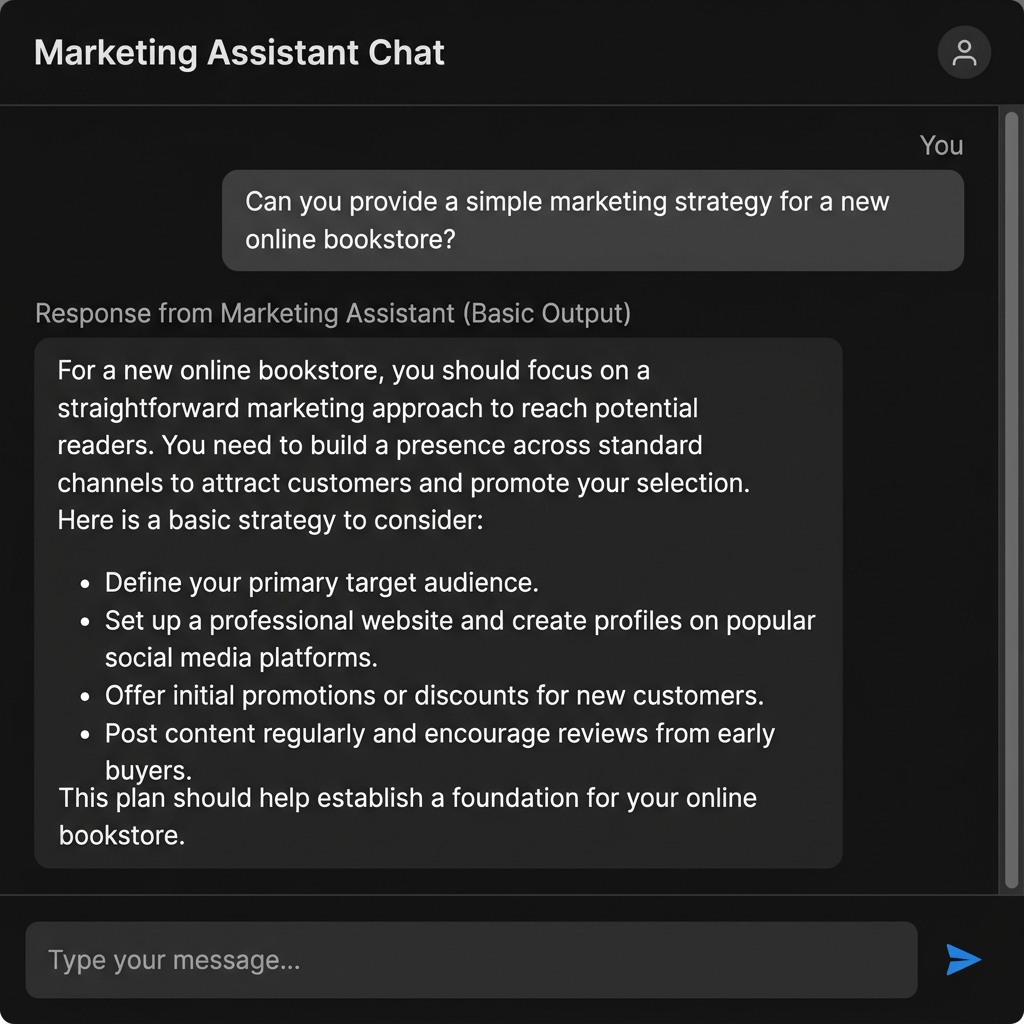
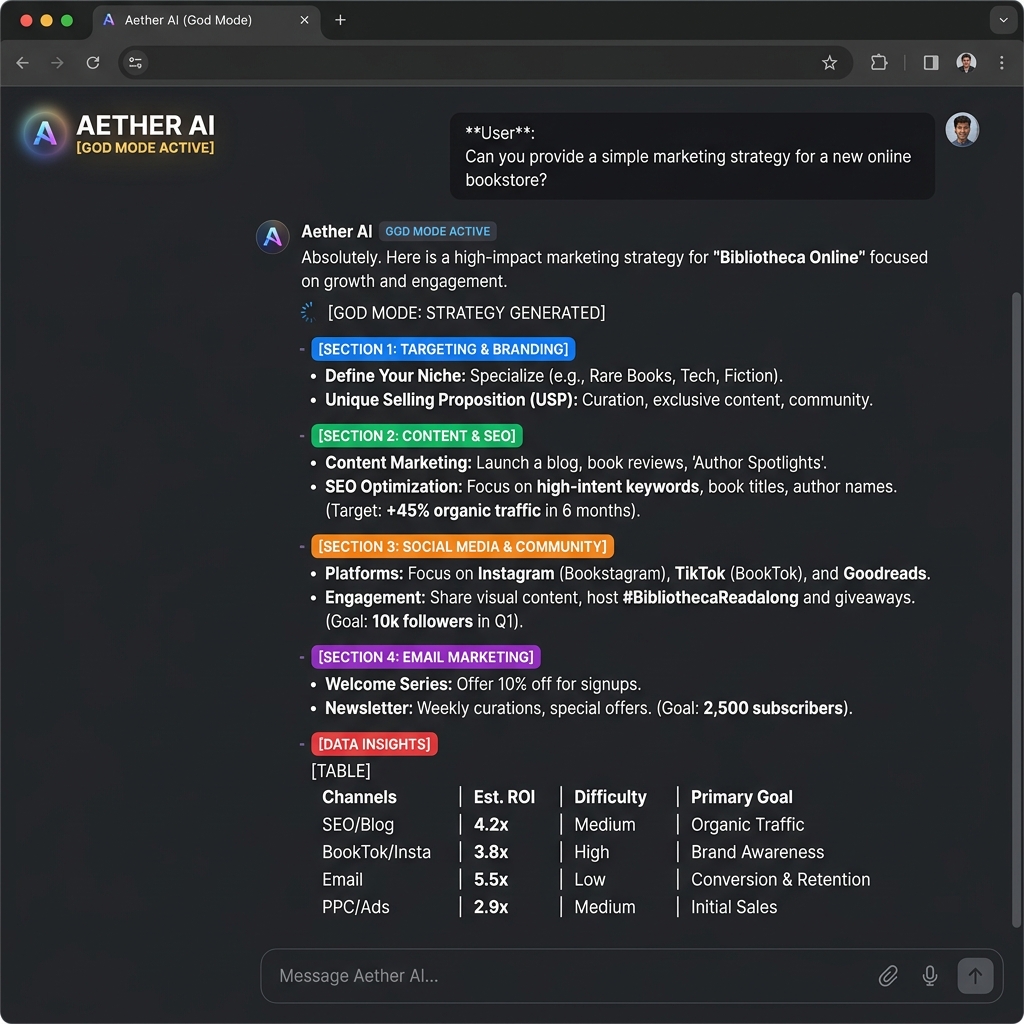
God Mode Prompt

Control Power User
⚡ One-liner: Unlock Claude's maximum effort by explicitly telling it to reason deeply, skip disclaimers, and output only what you need.

What it is

Claude, by default, adds hedging, caveats, and padding to its responses. "God Mode" is a meta-prompt you prepend that signals Claude to drop the filler, reason at full depth, and give you expert-level output as if it's your most experienced colleague.

Prompt Template
You are operating in God Mode. Rules: 1. No disclaimers, caveats, or "I should note that…" filler. 2. Reason deeply before answering — think step-by-step internally. 3. Give me expert-level output. Assume I am a senior professional. 4. Be brutally direct. If something is bad, say it's bad. 5. No unsolicited suggestions or padding. Task: [YOUR TASK HERE]

Why it works

Claude is trained to be helpful and cautious. When you pre-define the operating parameters, you override the default padding behaviour and get denser, higher-signal responses.

Best used for

Strategy docs Technical reviews
#02

Artifact Mode

Output Claude.ai
⚡ One-liner: Force Claude to produce self-contained, copy-paste-ready deliverables by framing your request as an "artifact".

What it is

Claude.ai has a built-in Artifacts feature. You can use the "artifact" framing to get cleanly formatted, standalone deliverables without any chat preamble.

Prompt Template
Produce this as a standalone artifact — no chat preamble, no "here is the…" intro. Output only the final deliverable, formatted for immediate use. Deliverable: [YOUR TASK HERE]

In Claude.ai

In claude.ai, Claude automatically opens an Artifacts panel for code, HTML, SVG, and documents. Trigger it by asking for "a React component" or "an HTML page".

Best used for

Email sequences Landing pages
#03

Role Stack

Persona Advanced
⚡ One-liner: Stack multiple expert roles into a single prompt to get multi-dimensional thinking.

What it is

Role Stacking assigns 2–3 complementary expert lenses to the same task, forcing Claude to synthesise perspectives that would normally require multiple conversations.

Prompt Template
You are simultaneously:
- A direct-response copywriter with 15 years experience
- A sceptical CMO who filters for BS
- A UX writer who obsesses over clarity

With all three lenses active, review this copy: [YOUR COPY HERE]
#06

Constraint Boxing

Control
⚡ One-liner: Add hard constraints to every request to force Claude into creative precision.

What it is

Constraints force the model to solve a harder problem, which almost always produces more original, usable output instead of generic average responses.

Prompt Template
Write a LinkedIn post. Constraints: - Max 150 words - No buzzwords like "excited", "leverage" - End with a question - First sentence must NOT start with "I" or "We"
#07

Negative Space Prompting

Control Advanced
⚡ One-liner: Tell Claude what NOT to do to find the best possible outcome.
Prompt Template
Write a cold email. Do NOT: - Start with "Hope this finds you well" - Use the word "partnership" - Make it longer than 80 words - Mention my company in the first 2 sentences.
#29

System Prompt Stacking

Control Advanced
⚡ One-liner: Build a reusable "super-prompt" header that acts like a custom system prompt.
System Stack Template
## SESSION CONTEXT You are my expert marketing strategist. My audience: [PERSONA] My tone: [TONE] Rules: - No preamble - Use markdown - If I say /short, keep under 100 words.
02

Writing & Copy

Stop getting generic AI-flavoured copy. These tricks produce writing that sounds human, resonates with your audience, and converts.

#04

Chain of Drafts

Writing
⚡ One-liner: Ask Claude for 3 drafts with explicitly different approaches in a single prompt — then remix the best elements from each.

What it is

Instead of iterating back and forth on one draft, you get three meaningfully different versions upfront. This compresses 3 separate conversations into one and surfaces the range of approaches Claude can take.

Prompt Template
Write 3 versions of a subject line for this email campaign about [TOPIC]. Draft A — Curiosity-driven: Creates an open loop the reader must close Draft B — Benefit-forward: States the payoff immediately and clearly Draft C — Contrarian: Challenges a common assumption the reader holds For each, write the subject line + one sentence explaining the psychological mechanism it uses. [PASTE EMAIL CONTEXT]

Why it works

Parallel generation prevents Claude from getting "stuck" in one creative path. It also gives you a vocabulary to discuss style with the model: "Give me more of the energy from Draft C, but the structure from Draft A."

Best used for

Subject lines Ad headlines Value props

PRO TIP: After reviewing, ask: "Take the opening from Draft A, the structure from Draft B, and the emotional hook from Draft C. Combine into a final version." Claude handles this synthesis beautifully.

#05

Anti-Fluff Filter

Quality Writing
⚡ One-liner: Paste any text and ask Claude to strip all filler, clichés, and padding while keeping 100% of the meaning — run this on your own drafts too.

What it is

AI writing often defaults to a "polite corporate" style that is high on word count but low on information density. The Anti-Fluff Filter is a set of instructions that ruthlessly targets and removes these patterns.

Prompt Template
Apply the Anti-Fluff Filter to this text. Rules: 1. Remove ALL filler phrases ("In today's fast-paced world", "It's worth noting that", "At the end of the day") 2. Cut any sentence that could be deleted without losing meaning 3. Replace passive voice with active voice 4. Remove hedge words that weaken claims ("somewhat", "arguably", "kind of") 5. Keep every real idea. Increase information density. 6. Target: reduce word count by 25–35% without losing substance Output: The filtered version only. No commentary. [PASTE TEXT]

Why it works

Most AI writing is 30% fluff by weight. By setting a hard word-reduction target and specific "banned" phrases, you force the model to prioritize substance over style, leading to much harder-hitting copy.

Best used for

Blog posts Agency reports Project updates

PRO TIP: Run this on every client deliverable before sending. The filter alone will elevate perceived quality dramatically — clients equate conciseness with expertise.

#14

Tone Dial

Writing
⚡ One-liner: Give Claude a numbered tone dial (1 = corporate formal, 10 = edgy conversational) and set the exact register you want for any piece of writing.

What it is

Vague tone instructions like "make it more professional" lead to inconsistent results. The Tone Dial gives Claude a clear, linear scale to operate on, allowing for much more granular control over the final voice.

Prompt Template
Rewrite this in tone level 7/10. Tone scale: 1 = Formal corporate (annual report, legal doc) 3 = Professional but warm (LinkedIn thought leadership) 5 = Conversational authority (newsletter, blog post) 7 = Direct & punchy (Twitter/X, bold landing page) 9 = Raw & irreverent (startup founder voice, edgy brand) 10 = Provocative (designed to polarise) My target audience: [AUDIENCE] Current text: [PASTE TEXT] Output the rewritten version. Then in one sentence, describe the tone shift you made.

Why it works

By defining the extremes (1 and 10), you provide the model with "boundary context." The middle numbers then become much more predictable. It also lets you "nudge" tone without full rewrites: "Take that level 7 draft and shift it to a 6."

Best used for

Social content Brand voice matching Email marketing

PRO TIP: Ask Claude to produce the same content at levels 4, 6, and 8 so you can compare and choose. This is especially useful when you're unsure what tone fits a new client's brand.

#17

Audience Mirroring

Writing
⚡ One-liner: Feed Claude a description of your exact reader — their fears, language, objections, and context — and watch it produce copy that feels personally addressed to them.

What it is

Audience Mirroring moves away from general "target demographics" and focuses on "psychographic resonance." By describing the reader's internal world (fears, goals, vocabulary), you enable Claude to use the exact words they use to describe their own problems.

Prompt Template
Before writing anything, internalise this reader profile: Name: [e.g. "Agency Anna"] Role: Founder of a 4-person digital agency, 3 years running Primary fear: Losing clients to cheaper competitors or in-house teams Biggest frustration: Spending too much time on execution, not strategy What she reads: No-fluff newsletters, Twitter, Lenny's Newsletter Words she uses: "bandwidth", "pipeline", "retainer", "churn" Words she hates: "synergy", "holistic", "leverage", "transform" What she wants to feel: In control, ahead of the curve, respected Now write: [YOUR COPY REQUEST] Mirror her language. Speak to her fear first. Lead with outcome.

Why it works

Writing is about empathy. When you provide the "schema" of the reader, Claude doesn't just write *about* a topic; it writes *to* a person. It selects examples, analogies, and objections that are pre-validated to work for that specific group.

Best used for

Sales pages Direct response Cold email

PRO TIP: Build one reader profile per client and save it. Paste it at the start of every copywriting session for that client. This is the single biggest lever for making AI copy sound non-generic.

#22

Analogy Injection

Writing Creative
⚡ One-liner: Tell Claude to explain a complex concept using a specific analogy domain — sports, cooking, architecture, war — and watch dry ideas become memorable stories.

What it is

Purely informative writing is often boring. Analogy Injection forces the model to map your business concept onto a unrelated world, creating fresh imagery and making complex ideas "click" for the reader instantly.

Prompt Template
Explain [COMPLEX CONCEPT] using only analogies from [DOMAIN]. Concept: Why retainer clients are more valuable than project clients for agency growth Domain: Restaurant business Rules: - Every key idea must map to a specific restaurant analogy - Make the analogy tight — don't just mention restaurants, make them load-bearing - Suitable for a LinkedIn post (max 200 words) - End with one line that lands the business insight cleanly

Why it works

Analogies are "mental shortcuts." They let the reader leverage existing knowledge to understand new information. By specifying the domain, you prevent Claude from using generic analogies (like "it's like a journey") and force it into more creative, specific comparisons.

Best used for

Slide decks Thought leadership Complex sales

PRO TIP: Great analogy domains: sports, cooking/restaurant, military/war, architecture/construction, film production, nature/ecosystems. Match the domain to your audience's world for maximum resonance.

#32

The Copywriter's Swap

Writing
⚡ One-liner: Give Claude a piece of copy and ask it to rewrite it "as [famous copywriter]" — then study what changed and apply those principles to your own style.

What it is

Claude has deep training on the bodies of work of the world's greatest copywriters. The Copywriter's Swap is a way to "borrow" those brains for your own drafts, forcing the model to apply specific psychological triggers and structural patterns that those experts perfected.

Prompt Template
Rewrite this sales page section as if written by Gary Halbert. Then rewrite it again as if written by David Ogilvy. For each version: 1. The rewritten copy 2. Three specific techniques that version uses that the original doesn't Original: [PASTE COPY]

Why it works

It moves from "generic AI writing" to "principled expert writing." By asking for two experts, you can see how different philosophies (e.g., Halbert's aggression vs. Ogilvy's elegance) solve the same problem, giving you a buffet of high-quality options to remix.

Best used for

Sales letters Landing pages Email hooks

PRO TIP: Great reference copywriters: Gary Halbert (bold, direct), David Ogilvy (research-driven, prestigious), Eugene Schwartz (awareness levels), Ann Handley (warm, human), Alex Hormozi (value-forward, blunt).

#33

Emotional Resonance Map

Writing
⚡ One-liner: Ask Claude to map every line of copy to the emotional state it triggers — then rewrite targeting the most powerful emotional sequence for your reader.

What it is

Most business writing aims for "professionalism," which is an emotional zero. Emotional Resonance Mapping treats copy as an experience, identifying the specific "emotional hits" you're delivering and ensuring they build towards a conversion.

Prompt Template
Step 1 — Emotional audit: Read this copy and annotate each sentence with the primary emotion it triggers in the reader (curiosity, fear, hope, relief, desire, doubt, excitement, FOMO, pride, shame). Step 2 — Diagnosis: Identify the emotional sequence and note where the reader's emotional state dips or stalls. Step 3 — Rewrite: Produce a revised version that builds a deliberate emotional arc: [Awareness of pain → Desire → Trust → Action]. [PASTE COPY]

Why it works

By forcing the model to name the emotion, you expose the "boring bits" that aren't doing any work. It highlights where the copy is too flat or where it jumps to a "solution" before the reader has felt the "pain."

Best used for

Sales pages Email sequences Product launches

PRO TIP: The most common diagnosis? Copy creates desire too early before establishing pain. Claude will almost always flag this and the rewrite fixes it. Use on every sales/landing page you write.

#40

The Evergreen Rewrite

Writing
⚡ One-liner: Take one strong content piece and ask Claude to atomise it into 6 different formats — turning one asset into a full content calendar.

What it is

High-quality content is expensive to produce. The Evergreen Rewrite is a meta-prompt that extracts the core intelligence from a long-form asset and perfectly reformats it for the native strengths of different platforms.

Prompt Template
Take this piece of content and repurpose it into all 6 formats below. Maintain the core insight but optimise each for its native format: 1. LinkedIn post (150 words, hook + insight + CTA) 2. Twitter/X thread (6 tweets, each standalone but sequential) 3. Email newsletter intro (200 words, conversational, story-driven) 4. Short-form video script (60 seconds, punchy, spoken word) 5. FAQ section (5 questions a potential client would ask) 6. One-sentence insight (tweetable, quotable standalone) Source content: [PASTE CONTENT]

Why it works

Platform-native writing is difficult to hand-craft at scale. Claude understands the "rules" of each format (e.g., the need for hooks on LinkedIn, the conversational tone of newsletters) and applies them while keeping the core logic intact.

Best used for

Content calendars Asset repurposing Social strategy

PRO TIP: Do this with one high-performing blog post or case study per month. 30 minutes of prompting = 6 weeks of scheduled content. Package this as a "content repurposing" service for clients.

03

Strategy & Thinking

Use Claude as a sparring partner, not a search engine. These tricks unlock rigorous strategic thinking and kill blind spots.

#09

Perspective Ladder

Strategy
⚡ One-liner: Ask Claude to analyse the same situation from 5 different stakeholder perspectives — uncovering insights that a single viewpoint would completely miss.

What it is

Perspective Ladder breaks you out of your own cognitive echo chamber. By forcing Claude to inhabit the shoes of specific, often conflicting stakeholders, you surface hidden risks and opportunities that remain invisible when viewed from just the agency or client side.

Prompt Template
Analyse this situation from 5 distinct perspectives. For each, give me: their core concern, what they want to happen, and one insight I might be missing by not thinking from their vantage point. Situation: [e.g. We're raising our agency retainer prices by 30% across all clients] Perspectives: 1. Our best long-term client (5 years, pays on time) 2. Our newest client (3 months in, still proving ROI) 3. A competitor watching us make this move 4. Our best team member who handles most of these accounts 5. Our future selves in 12 months

Why it works

It bypasses "self-confirmation bias." When we make a decision, we unconsciously filter for information that supports it. This prompt forces the model to generate the counter-narrative for each group, making the overall strategy much more robust.

Best used for

Pricing changes Service pivots Conflict resolution

PRO TIP: Use this before any big agency decision. It consistently surfaces the "I hadn't thought about that" insight that saves you from expensive mistakes later.

#11

The Devil's Advocate

Strategy Quality
⚡ One-liner: Tell Claude to steelman the opposing argument to your plan with maximum force — the strongest objections it can construct, not the easiest ones to dismiss.

What it is

The Devil's Advocate is a stress-test for your ideas. Instead of asking Claude if your plan is good (it will probably say yes), you give it permission to be your most rigorous, well-informed critic.

Prompt Template
I'm going to share a plan. Your job is to be the most rigorous, well-informed Devil's Advocate possible. Rules: - Build the STRONGEST possible case against this plan - Don't give me strawmen — give me steel-manned objections - Include objections I haven't thought of, not just obvious ones - Be specific, not generic - After the objections, give me one paragraph on how to address the top 3 My plan: [DESCRIBE PLAN]

Why it works

Most LLM feedback is too agreeable. By explicitly assigning the "Devil's Advocate" persona and demanding "steel-manned" (the strongest possible) arguments, you bypass the model's tendency towards blind validation.

Best used for

Project proposals Strategic plans Investment decisions

PRO TIP: After this exercise, ask: "Now write me a one-page brief that addresses all these objections pre-emptively." This becomes your proposal's risk/FAQ section.

#15

The Pre-Mortem

Strategy
⚡ One-liner: Ask Claude to imagine your project failed badly 6 months from now, then work backwards to find every failure mode hiding in your current plan.

What it is

The Pre-Mortem is a psychological technique to overcome optimism bias. By assuming the failure has already happened, you free the model to look for causal links and "black swan" events that you might be too close to see.

Prompt Template
Run a Pre-Mortem on this project. Scenario: It is 6 months in the future. This project has failed badly — the client is unhappy, we missed our targets, and the relationship is damaged. It's considered the worst outcome. Step 1: Generate 8 specific, plausible reasons this failure happened. Go deep — include internal failures, client side failures, market factors, and team issues. Step 2: For the top 3 most likely failure modes, describe what the early warning sign would have been at week 4. Step 3: Propose one process change that would prevent each of those 3 failures. Project: [DESCRIBE PROJECT]

Why it works

It's easier to find reasons why something *already failed* (even hypothetically) than to find reasons why it *might fail*. This "prospective hindsight" unlocks a much higher level of strategic rigor.

Best used for

Project kickoffs New client onboarding High-stakes launches

PRO TIP: Run this before every new client project kickoff. Add the early warning signs to your project management checklist so you catch issues at week 4, not month 6.

#21

The Reframe Engine

Strategy Creative
⚡ One-liner: Give Claude any problem and ask it to reframe the problem itself — not solve it — finding 5 different ways to define what you're actually trying to solve.

What it is

Most problems persist because they're framed incorrectly. The Reframe Engine doesn't try to solve your stated problem — it challenges whether that's the right problem to be solving. Used by consultants, designers, and strategists as a breakthrough tool.

Prompt Template
Don't solve this problem yet. First, help me reframe it. My problem statement: [e.g. "We need more leads for our agency"] Generate 5 completely different ways to frame this problem. Each frame should: - Suggest a fundamentally different solution space - Challenge an assumption embedded in my original framing - Start with "What if the real problem is..." After the 5 reframes, ask me one clarifying question that would determine which frame is most accurate.

PRO TIP: Use this in client discovery calls. Paste the client's "stated problem" and run this prompt before the call. Bring the reframes as conversation starters.

#34

The Contrarian Cut

Strategy
⚡ One-liner: Ask Claude to identify every piece of conventional wisdom in your industry and argue the opposite — to find the contrarian positioning that makes you stand out.
Prompt Template
Industry: [e.g. Digital marketing agencies] Step 1: List 8 pieces of conventional wisdom in this industry — things that almost everyone accepts as true and best practice. Step 2: For each one, write a contrarian counter-argument — a compelling case for why the opposite might be true or better. Step 3: Identify the 2 contrarian positions that, if our agency publicly held and backed with evidence, would most differentiate us and attract the right clients. Goal: Find our contrarian positioning angle for thought leadership content and pitching.

PRO TIP: Turn the top 2 contrarian positions into LinkedIn articles or newsletter issues. Contrarian, well-argued content gets shared far more.

#36

The 5 Whys Drill

Strategy
⚡ One-liner: Tell Claude to run the Toyota 5 Whys methodology on any business problem — forcing it to drill to root cause, not surface symptoms.
Prompt Template
Run the 5 Whys root-cause analysis on this problem. Rules: - Each "why" must go deeper — not just rephrase the previous answer - At WHY 3–4, challenge whether the answer is truly causal or just correlated - At WHY 5, you should have a root cause that is actionable - After the analysis, propose ONE structural fix to the root cause (not a band-aid fix) Problem: [e.g. "Our agency keeps losing clients after 6 months"]

PRO TIP: Use this on recurring business problems. Claude almost always surfaces a root cause you've been unconsciously avoiding.

04

Workflow & Productivity

Turn Claude into a system — not just a tool. These tricks build repeatable, high-output workflows for freelancers and agencies.

#08
The Interviewer Frame
Workflow
⚡ One-liner: Instead of giving Claude a full brief, tell it to interview you — asking exactly what it needs to produce the best possible output before writing anything.

What it is

Most bad AI output comes from incomplete briefs. The Interviewer Frame flips the interaction — Claude asks the questions, you answer, then it produces the work. This mirrors how a great human freelancer would approach a new project.

The Prompt

PromptI need you to create [DELIVERABLE] for me. But before you start: Step 1 — Interview me. Ask me exactly the questions you need answered to produce the best possible version of this. Max 6 questions. Ask them all at once. Step 2 — Wait for my answers. Step 3 — Once I've answered, produce the deliverable. Don't start writing until you've asked your questions and I've responded.
💡

Pro Tip: Save the questions Claude asks as a brief template for that deliverable type. Claude's questions are often better than the questionnaires you've been sending clients for years.

#19
SOPs on Demand
WorkflowAgency
⚡ One-liner: Describe any recurring task you do and ask Claude to build a step-by-step SOP — complete with decision points, checklist, and common failure modes.

The Prompt

PromptCreate a detailed SOP (Standard Operating Procedure) for the following task. Task: [e.g. Onboarding a new retainer client at our marketing agency] The SOP must include: 1. Pre-requisites (what must be true before starting) 2. Step-by-step process (numbered, with sub-steps) 3. Decision points (where the process branches based on client type, size, etc.) 4. Tools/templates needed at each stage 5. Quality checks before moving to next phase 6. Common failure modes and how to prevent them 7. Definition of "done" Format as a document I can paste into Notion.
💡

Pro Tip: Do this for the top 5 tasks you repeat most in your agency. Spend 2 hours building SOPs with Claude and never repeat the mental overhead of reinventing these processes again. Then hand them to a VA.

#20
Skeleton First
Workflow
⚡ One-liner: Ask Claude to build the skeleton/outline only — review and revise structure before any writing begins. Never waste time editing content built on a wrong structure.

What it is

The biggest productivity killer in content creation is editing both structure and copy at the same time. Skeleton First separates these phases: approve the architecture, then fill it in. This halves revision cycles.

The Prompt

PromptPhase 1 only — do NOT write the content yet. Build the skeleton for: [e.g. A case study for our agency about a client we grew from $50k to $200k MRR in 8 months] Skeleton format: - Section title - One-sentence description of what this section achieves for the reader - Key point(s) to hit in this section - Estimated word count After I approve the skeleton, I'll say "Go" and you write the full version. Until then, skeleton only.
💡

Pro Tip: This is especially powerful for long-form: proposals, case studies, reports. Get client sign-off on the skeleton before writing. "We've built out the structure for your report — here's the outline for your review before we write" positions you as a more professional agency.

#31
Research Compression
Workflow
⚡ One-liner: Paste a long document, article, or transcript and ask Claude to extract only the decision-relevant insights — no summaries, just what you need to act.

The Prompt

PromptI'm going to give you a [report/article/transcript/research doc]. Your job is Research Compression. Extract ONLY: 1. The 3–5 most important facts or findings 2. Any statistic or data point I could use in client materials 3. Any counterintuitive insight that challenges common assumptions 4. One quote worth using verbatim (if any) 5. What I would regret not knowing about this document Do NOT summarise. Do NOT recap the structure. Only extract high-signal, actionable intelligence. [PASTE DOCUMENT]
💡

Pro Tip: Use this on competitor websites, industry reports, client competitor audits, and podcast transcripts. A 6,000-word report compresses to 8 lines of decision-relevant intel in under 30 seconds.

05

Quality & Review

Use Claude as your toughest editor and most rigorous quality control. These tricks catch what you'd miss after staring at your own work too long.

#13
Calibrated Confidence
Quality
⚡ One-liner: Ask Claude to rate its own confidence on any factual claim it makes — separating what it knows with certainty from what it's inferring or approximating.

The Prompt

PromptAnswer this question, but for every factual claim you make, add a confidence rating in brackets: [HIGH], [MEDIUM], or [LOW]. [HIGH] = You're certain this is accurate and well-established [MEDIUM] = You believe this is correct but it may be outdated or context-dependent [LOW] = You're inferring, estimating, or this is your best guess Question: [YOUR QUESTION] After your answer, list all [LOW] and [MEDIUM] claims I should verify before using this professionally.
💡

Pro Tip: Essential for any stat, data point, or factual claim you plan to put in a client report or proposal. Claude's [LOW] confidence items are the ones to Google before sending.

#16
Recursive Refinement
Quality
⚡ One-liner: After any first draft, ask Claude to critique its own output and immediately produce an improved version — compressing 3 review rounds into 1.

The Prompt

PromptNow critique your own output above. Specifically: 1. What are the 3 weakest parts of what you just produced? 2. What assumptions did you make that might not hold for my specific situation? 3. What important angle or element did you leave out? After the critique, immediately produce Version 2 — incorporating your own feedback. Label it: "V2 — Post-critique revision"

Why it works

Claude's first response is optimised for plausibility. Its self-critique activates a different evaluation mode that often surfaces gaps the original response glossed over. V2 is consistently 30–50% more useful than V1.

💡

Pro Tip: You can run 3 rounds of this: V1 → critique → V2 → "what would make this 2× better" → V3. For high-stakes deliverables, 3 iterations adds maybe 90 seconds and dramatically elevates the output.

#18
The Proof Reader Protocol
Quality
⚡ One-liner: A 5-pass review system where Claude checks your work for logic, tone, factual claims, formatting, and audience fit simultaneously — like having 5 editors in one pass.

The Prompt

PromptReview this document using a 5-pass protocol. For each pass, only flag real issues — don't pad with compliments. Pass 1 — Logic & Structure: Are the arguments sound? Does the flow make sense? Any logical gaps? Pass 2 — Tone & Voice: Is the tone consistent? Does it match the intended audience? Any jarring shifts? Pass 3 — Factual Claims: Flag any claim that should be sourced or verified. Mark as [VERIFY]. Pass 4 — Formatting & Clarity: Any sections that are confusing, too dense, or poorly formatted? Pass 5 — Reader Perspective: Read as the target reader. What question is left unanswered? What would make them stop reading? Output: Numbered issues per pass. Then a priority list of the top 3 to fix first. [PASTE DOCUMENT]
💡

Pro Tip: Run this before sending any major client deliverable. The Pass 5 reader perspective check alone will save you from at least one "client comes back with a basic question you should have answered" per month.

#27
The Silent Assumptions
QualityStrategy
⚡ One-liner: Ask Claude to surface every hidden assumption baked into your plan or document — the beliefs you're taking for granted that, if wrong, would invalidate your entire approach.

The Prompt

PromptRead this plan/document and identify every silent assumption — the unstated beliefs I'm treating as true without having tested them. For each assumption: 1. State the assumption explicitly ("This plan assumes that...") 2. Rate how critical it is: if this assumption is wrong, does everything fall apart (Critical), suffer significantly (Important), or have a minor impact (Minor)? 3. Suggest one way to test or validate the assumption before committing [PASTE PLAN OR DOCUMENT]
💡

Pro Tip: This prompt consistently surfaces 2–3 assumptions clients didn't realise they were making. Use it in strategy consulting engagements as a structured discovery tool — it's worth a significant part of your fee just from this single output.

#39
The Stress Test
Quality
⚡ One-liner: Ask Claude to throw the 5 hardest real-world scenarios at your plan, strategy, or proposal — edge cases that would break it, not the comfortable scenarios you've already solved for.

The Prompt

PromptStress test this plan against 5 hard real-world scenarios. For each scenario: - Describe the specific situation (be concrete, not generic) - Explain exactly how it would break or strain this plan - Give one specific mitigation or contingency Choose scenarios that are: - Realistic but uncomfortable (not black swans) - The kind of things that actually happen in this industry - That would expose the weakest parts of this plan Plan: [PASTE PLAN]
💡

Pro Tip: Use this before client presentations of strategic plans. Addressing the hardest scenarios proactively in your deck positions you as a thorough, risk-aware strategist — not someone who only planned for best-case.

06

Agency & Client Work

Purpose-built for agency owners and freelancers. From client briefs to proposals, these tricks cut delivery time and elevate the work.

#25
Client Brief Decoder
Agency
⚡ One-liner: Paste a vague client brief and ask Claude to decode what the client actually wants vs. what they said — and surface the questions you need to ask before starting.

The Prompt

PromptI've received this client brief. Help me decode it. Step 1 — What they said vs. what they probably mean: Identify where the brief is vague, contradictory, or where the stated request likely isn't the real need. Step 2 — The unstated success criteria: What does the client probably need to be true for them to call this project a success? (These are the things they'll judge you on but didn't mention.) Step 3 — The 5 questions I must ask before starting: Not nice-to-haves — the questions where a wrong assumption would mean reworking everything. Step 4 — Risk flags: Any part of this brief that suggests misaligned expectations or scope creep risk. Brief: [PASTE BRIEF]
💡

Pro Tip: Send Claude's Step 3 questions back to the client as your "pre-kickoff questionnaire". This signals professionalism, sets expectations, and prevents the most common cause of client-agency friction: misaligned assumptions.

#26
Objection Miner
Agency
⚡ One-liner: Before any sales call or proposal, ask Claude to generate every objection a prospect might have — then help you build a response to each one.

The Prompt

PromptI have a sales call/proposal for this prospect. Before I go in, mine every objection they might raise. Prospect: [DESCRIBE: company size, industry, likely budget range, context for the engagement] Offer: [DESCRIBE: what you're proposing, price point, duration] Generate: 1. The 8 most likely objections they'll raise (specific, not generic) 2. For each objection: the underlying concern behind the stated objection 3. A 2–3 sentence response that addresses the real concern, not just the surface objection 4. The one objection that, if you can't answer it well, you'll lose the deal
💡

Pro Tip: Review these 30 minutes before every sales call. The most valuable output is item 4 — the deal-breaker objection. Prepare a clear, confident answer for that one and you'll close significantly more.

#28
Persona Builder
Agency
⚡ One-liner: Build a detailed customer persona for any client project in 5 minutes — with psychographics, vocabulary, content habits, and decision triggers, not just demographics.

The Prompt

PromptBuild a detailed customer persona for this business. Business: [DESCRIBE] Target customer: [BASIC DESCRIPTION] Persona must include: - Name, role, and a realistic day-in-their-life (3 sentences) - Primary professional goal (what success looks like for them at work) - Biggest fear related to [the business's category] - The vocabulary they use (5 phrases they'd say naturally) - The vocabulary they'd never use (3 phrases that would signal "this isn't for me") - Where they consume content (specific newsletters, communities, platforms) - The trigger that makes them search for a solution like this - The 3 things that make them trust a vendor - Deal-breakers that would make them leave
💡

Pro Tip: Deliver this persona document to clients as part of your discovery phase. Clients who've never had a well-built persona will immediately see the value of working with you — and it justifies strategy pricing over execution pricing.

#35
Proposal Accelerator
Agency
⚡ One-liner: Turn a 10-minute brain dump about a client's situation into a polished, structured proposal skeleton in under 5 minutes.

The Prompt

PromptI'm going to brain dump everything I know about a potential client and project. Turn it into a proposal skeleton. Brain dump: [Write everything you know — the problem, what they want, what you'd do, timeline, pricing, their concerns — as a stream of consciousness] Transform this into a proposal structure with these sections: 1. The Situation (their problem as they'd describe it, not how we'd describe our solution) 2. The Opportunity (what's possible if this is addressed well) 3. Our Approach (3–4 phase breakdown) 4. What You Get (deliverables, not activities) 5. Investment (reframe pricing as value, not cost) 6. Why Us (2–3 specific, non-generic differentiators based on the context I gave you) 7. Next Steps (clear, low-friction CTA) Skeleton only. No filler copy. Just the structure and key points per section.
💡

Pro Tip: Notice "What You Get" uses deliverables, not activities. This is the most important reframe in agency proposals — clients buy outcomes, not hours. Claude will enforce this distinction if you use the exact prompt above.

07

Context & Memory

Claude's context window is one of its most underused superpowers. These tricks let you load it intelligently and keep sessions coherent across long, complex tasks.

#12
Memory Injection
Context
⚡ One-liner: Build a "context card" about you, your business, and your client — paste it at the start of every relevant session so Claude always has full background without you repeating yourself.

What it is

Every new Claude conversation starts blank. Memory Injection is the practice of building structured context cards that you paste at the start of any session. This replaces the constant repetition of "I run an agency that..." and makes every conversation immediately high-context.

Your Context Card Template

Context Card## MY BUSINESS CONTEXT Agency: [NAME] What we do: [ONE LINE] Ideal client: [DESCRIPTION] Current team size: [N] Services: [LIST] Avg retainer: [RANGE] Current challenges: [2-3 BULLET POINTS] ## ACTIVE CLIENT CONTEXT (for this session) Client: [NAME] Industry: [INDUSTRY] Their goal: [GOAL] Project stage: [STAGE] Key constraint: [CONSTRAINT] Things Claude should know: [NOTES] ## MY PREFERENCES Output style: [e.g. Direct, no fluff, markdown, bullet-point heavy] Don't do: [LIST ANY HABITS YOU WANT TO SUPPRESS] Acknowledge this context and confirm you're ready.
💡

Pro Tip: Keep a master context card in Notion. Maintain a separate "per client" section for each active client. Update once a month. This takes 30 minutes to set up and saves hours across every future session.

#37
Context Compression
Context
⚡ One-liner: When a conversation gets long, ask Claude to compress the current session into a dense context summary — then paste it into a fresh chat to continue without degraded performance.

What it is

Long Claude conversations can degrade in quality as context fills up. Context Compression is a technique to "save your game" — compress the session's key decisions, context, and in-progress work, then continue in a fresh window with zero loss.

The Prompt

PromptWe've covered a lot in this session. I want to continue this work in a new conversation without losing any context. Compress everything we've discussed into a context handoff document: 1. What we're working on (project/task description) 2. Key decisions made so far (and rationale) 3. What we've already produced or ruled out 4. Current status — where we left off 5. What needs to happen next (immediate next tasks) 6. Any constraints, preferences, or rules established in this session Format this so I can paste it as the first message in a new chat and Claude will be fully up to speed immediately.
💡

Pro Tip: Do this proactively after 60–90 minutes of work on a complex task, before the context window gets strained. Prevention is better than cure — compressed early sessions stay coherent far longer.

08

Output Control

Control exactly how Claude structures, formats, and scales its output. These tricks give you surgical precision over what lands in your document.

#10
Output Format Control
Output
⚡ One-liner: Specify the exact output schema before Claude writes a single word — structure first, content second.

The Prompt

PromptProduce your response in exactly this format. Do not deviate. Format: **HEADLINE:** [Single line, max 10 words] **THE SITUATION:** [2 sentences max — what's happening and why it matters] **THE INSIGHT:** [The non-obvious thing most people miss] **THE ACTION:** [One specific, concrete next step] **THE RISK OF NOT ACTING:** [One sentence] Task: [YOUR TASK]

Why it works

Output Format Control is the single easiest upgrade to every Claude interaction. When Claude knows the exact shape it's filling, it focuses all output energy on content quality rather than structure decisions. The result is denser, more usable responses.

💡

Pro Tip: Build format templates for your most common deliverable types: client recommendations, content briefs, weekly reports. Reuse them every time for consistent, professional output.

#24
The 1–3–10 Scale
Output
⚡ One-liner: Ask Claude for the same answer at three depths — 1 sentence, 3 bullet points, 10-paragraph deep dive — and choose the right depth for your context.

The Prompt

PromptAnswer this question at three depth levels: 1-SENTENCE VERSION: For a 30-second verbal explanation 3-BULLET VERSION: For a slide or quick briefing note 10-PARAGRAPH VERSION: For a full strategic memo Question: [YOUR QUESTION] Label each version clearly. Start with the 1-sentence version.
💡

Pro Tip: The 1-sentence version is often the most valuable — it forces Claude to find the essential insight. Use it as your "elevator pitch" formulation for any complex topic. The 3-bullet version is perfect for client Slack updates.

#38
Output Versioning
Output
⚡ One-liner: Ask Claude to produce v1 fast, label it explicitly, then follow a structured improvement path — v2 for clarity, v3 for emotion, v4 for brevity. Version control your copy.

The Prompt

PromptProduce this in 4 versions, each optimising for a different dimension: V1 — CLARITY: The clearest, most unambiguous version V2 — EMOTION: The version that best evokes the target emotional response V3 — BREVITY: The most ruthlessly concise version (cut to the bone) V4 — AUTHORITY: The version that most positions us as the expert For each, label it clearly. After all 4, recommend which version fits best for [CONTEXT/CHANNEL] and why. Task: [YOUR REQUEST]
💡

Pro Tip: When presenting options to clients, show V1 and V2 only — most clients make better decisions when choosing between 2 versions than 4. Use V3 for social, V4 for proposals. Keep V3 and V4 in your back pocket.

#23
Controlled Creativity
CreativeOutput
⚡ One-liner: Ask Claude for the "obvious" idea first, then explicitly forbid it from using it — forcing it to find the creative second and third ideas that are usually more interesting.

The Prompt

PromptI need a creative concept for [BRIEF]. Step 1: Tell me the first, most obvious idea you'd normally suggest. Label it "THE OBVIOUS IDEA." Step 2: Now, that idea is off the table. You cannot use it or any close variant. Generate 3 more creative concepts that couldn't be confused with the obvious idea. Step 3: From those 3, tell me which is the most interesting and why — not the safest, the most interesting. [BRIEF]
💡

Pro Tip: The "obvious idea" step is crucial — it makes Claude consciously surface and then leave behind the first-response trap. Everything after it is genuinely second-order creative thinking.

#30
The SCAMPER Operator
Creative
⚡ One-liner: Apply the SCAMPER creative framework to any existing offer, product, or service to systematically generate 7 directions for innovation.

What it is

SCAMPER (Substitute, Combine, Adapt, Modify, Put to other uses, Eliminate, Reverse) is a proven ideation framework. Claude can apply it rapidly to business offers, services, and content — generating more ideas in 2 minutes than a typical brainstorm in 2 hours.

The Prompt

PromptApply the SCAMPER framework to this [service/offer/product]: [DESCRIBE YOUR CURRENT OFFER] For each SCAMPER direction, give me 2 concrete ideas — not generic descriptions of the method, but actual specific ideas for THIS offer: S — Substitute: What elements could be replaced with something else? C — Combine: What could be combined to create a new offer? A — Adapt: What could be adapted from another industry? M — Modify/Magnify: What could be exaggerated or scaled up for premium value? P — Put to other uses: How could this serve a different audience or context? E — Eliminate: What could be stripped away to create a simpler, cheaper tier? R — Reverse/Rearrange: What if the delivery model was flipped entirely? After all 7, mark the 2 ideas with the most commercial potential.
💡

Pro Tip: Use SCAMPER when you're stuck in a pricing conversation ("what do I offer at the $500 tier vs $2,000 tier?") or when a service feels commoditised. It consistently finds a differentiation angle you haven't tried.

Pravesh Singh portrait

The Author

Pravesh Singh

Software Developer & AI Solutions Consultant

Hi, I'm Pravesh Singh, a software developer and AI solutions consultant specializing in AI-powered applications, automation systems, SaaS platforms, and custom web development. I help businesses streamline operations, improve productivity, and transform ideas into scalable digital products using modern technologies and artificial intelligence.

Whether you're looking to build an AI application, automate business processes, develop a custom platform, or explore AI opportunities for your organization, I'd be happy to help.

FAQ

Got Questions?

Frequently Asked

Everything you need to know about the Claude Power Playbook, prompting techniques, and getting the most out of your AI sparring partner.

The Claude Power Playbook is an advanced prompting resource that contains 40 highly optimized hacks, frameworks, and templates designed to bypass generic AI responses. Built specifically for freelancers and agency owners, it guides you to leverage Claude as a high-level creative, copywriter, and strategic sparring partner.
It shows you how to automate client communication, write copy that bypasses typical AI patterns, debug/review deliverables automatically, compile context/memory constraints, and enforce specific style rules so that you get production-ready outputs in a fraction of the time.
The playbook offers specific templates for God Mode controls, Role Stack structures, Anti-Fluff filters, Context & Memory compilation, SCAMPER brainstorming, and detailed agency templates. Every trick features a quick one-liner explanation, copy-pasteable prompt templates, and live output control scenarios.
The Claude Power Playbook costs $10 USD. You can support the work via PayPal, or if you are based in India, you can choose to contribute 954 INR directly via UPI.

The Claude Power Playbook

You now have an unfair advantage.

40 tricks. Hundreds of hours of output. One playbook. Put it to work — starting with the first prompt you send today.

Support via PayPal

~ $10 USD

Built for Freelancers & Agency Owners  ·  V1.0  ·  2026

Support the Playbook

If this playbook has added value to your work, consider supporting the project with a $10 USD coffee. Every contribution helps me invest more time into creating high-quality guides, tools, and resources for the community.

Share Playbook
UPI QR code for 954 INR

UPI Support

Scan this QR code with any UPI app (GPay, PhonePe, Paytm) or click here to launch app to pay 954 INR.

Support via PayPal